
The AI-Native Cloud: The Agent Stack
A map of the AI-native cloud (managed agent runtimes, serverless inference, routing, caching, knowledge bases, evaluations, GPUs) followed by a product-by-product tour of what a full AI cloud offers, with illustrative pricing.
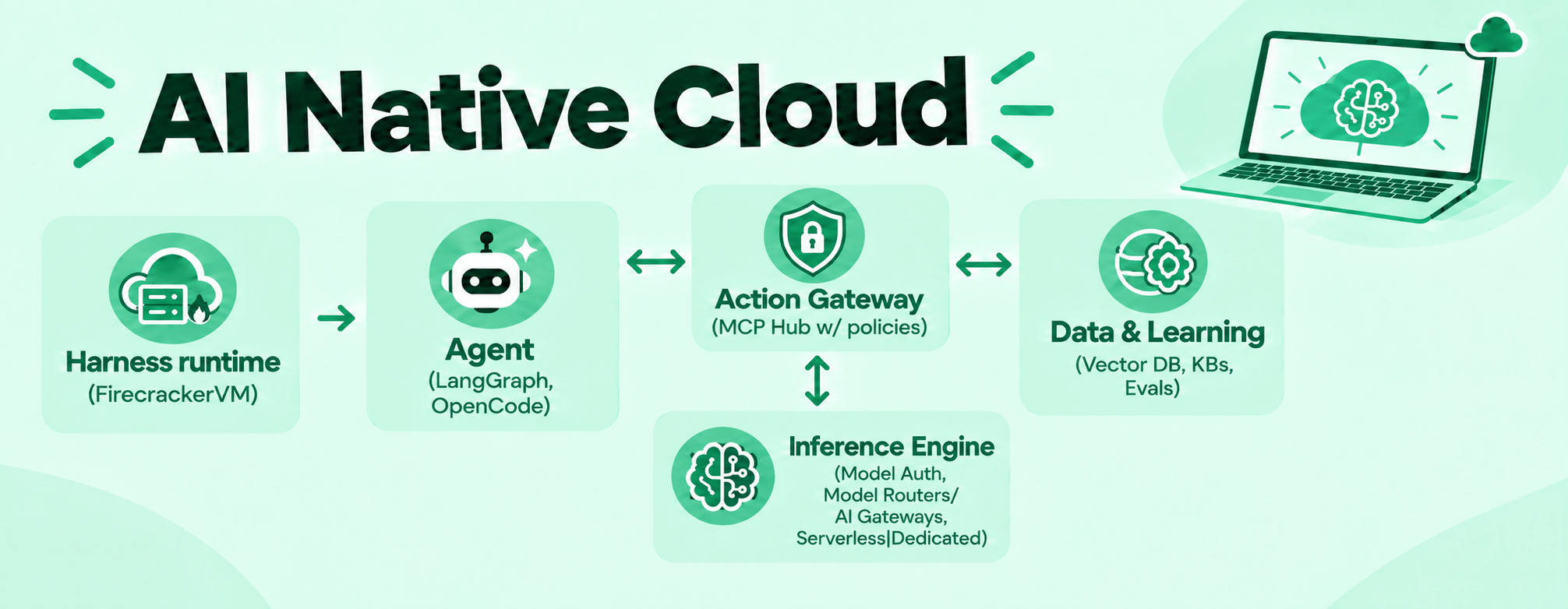
Hyperscalers and hosting platforms now pitch themselves as an "AI-native cloud". The branding differs, but the offerings fall into the same handful of layers. This post first maps those layers in general, then tours the products you can expect to find, with illustrative pricing.
The big picture
| Layer | What it is | Example products |
|---|---|---|
| Agent runtime | A managed runtime that runs AI agents (Claude Code, Codex, etc.) in isolated microVM sandboxes (Firecracker-style: own kernel, fast start, pause and resume) | AWS Bedrock AgentCore, E2B and Vercel sandboxes, Anthropic Managed Agents |
| Tool / MCP gateway | A gateway that gives agents access to tools and MCP servers, with central auth, permissions and audit logs | Composio, Arcade |
| Models / inference | Call models by API (pay per token), rent a GPU endpoint for one model, run big offline jobs, or auto-pick a model per request | OpenAI API / AWS Bedrock (serverless), SageMaker endpoints (dedicated), OpenAI Batch API, OpenRouter / Martian (router) |
| Data / context | Turn documents into searchable vectors for RAG; managed vector engines and databases | Bedrock Knowledge Bases, Pinecone, Azure AI Search |
| Quality | Score a model's answers against a dataset using a "judge" model | Bedrock Model Evaluation, OpenAI Evals, LangSmith |
| Raw compute | Rent GPU virtual machines by the hour | AWS EC2 P/G instances, Lambda Labs, CoreWeave |
| Distribution | Pre-built agents and add-ons you can deploy | AWS Marketplace |
Managed agent runtimes are the newest layer and the one providers are pushing hardest. Agents run generated code, so the sandbox is the core design choice: most runtimes isolate each session in a Firecracker-style microVM (its own kernel, near-container start times, built-in pause and resume) rather than a shared-kernel container. See Managed agent runtimes and the Firecracker primer. Older "generative AI platform" products are being folded into separate inference and agent offerings.
Why inference gets hard at scale
Making a model answer a prompt is easy. Doing it reliably, across several models, without wasting budget is not. Once real users arrive you face:
- GPU contention and unpredictable traffic. One enterprise customer or one agent integration can multiply request volume overnight.
- Shifting latency and cost tradeoffs.
- Multi-model orchestration across text, vision, image, video and audio, each with different API contracts and failure modes.
Serverless inference exists to separate consuming models from managing the infrastructure under them.
Serverless inference
You call models through an API with one key and one base URL, and pay per token with no reserved capacity. The provider handles GPU allocation, scaling and model lifecycle. Because the service keeps no session, every request carries the full context the model needs.
Most providers expose OpenAI-compatible endpoints, and many add an Anthropic-compatible one. Switching provider is often a change to the base URL and the key. The common surface:
| API | Mode | Use |
|---|---|---|
| Models | Sync | List available models |
| Chat completions | Sync | Chat-style prompts, text and vision |
| Responses | Sync | Multi-step tool use, stateful interactions |
| Messages | Sync | Anthropic-compatible, for Claude Code and agentic workflows |
| Image generation | Sync | Text-to-image |
| Text-to-speech | Sync | Binary audio out |
| Embeddings | Sync | Vectors for search and RAG |
| Video generation | Async | Submit a job, poll, download; results usually expire after a short window |
Streaming (server-sent events) is standard for chatbots and code assistants. It is an architectural constraint, not a feature: it shapes load balancer timeouts, proxy design, billing metering and error handling.
How a request flows
A typical path looks like this:
- Edge: TLS, DDoS protection and proxying.
- Load balancer / gateway: validates the key, resolves the tenant, enforces rate limits and network restrictions (for example, keys bound to a private network), and checks the request against the model's contract so bad parameters fail fast with a clear error.
- Inference API: metering, streaming, and orchestration of routing and built-in tools. Stateless and autoscaled.
- Translation layer: converts a standard request into each backend's native format and normalizes the response.
- Model backend: a self-hosted runtime for open-weight models, or the vendor's API for commercial ones.
- Billing events: written to a queue asynchronously, off the critical path, so billing never adds latency.
The translation layer is the least visible and most valuable piece. Providers differ on tool-call structure, streaming events, supported parameters and error shapes. Absorbing those quirks in one place lets every model behave the same behind every endpoint, so you can call a commercial model and an open-weight model with the same key and get identically shaped responses.
For open-weight models, a common runtime pairs an orchestrator that schedules models across shared GPU pools (Ray) with a serving engine that handles KV cache and continuous batching (vLLM). Pooling is what makes per-token pricing possible.
Platform features that matter in production
Prompt caching
Repeated prefixes are billed at a lower rate. This matters most for agent loops, where most input tokens repeat from one request to the next. Support varies: commercial vendors offer it with explicit controls (cache markers with a time-to-live on one side, retention settings on prompts of roughly 1,000+ tokens on the other), while self-hosted open-weight models often lack it.
Reasoning
Models that support it can return a step-by-step thinking trace alongside the final answer. Controls differ by vendor: an effort level, a token budget for thinking, or both. When only the effort level is set, the budget is typically a percentage of the output limit.
Built-in tools
Server-side tools let you attach a definition to a request while the platform handles discovery, execution and response integration. Common ones are knowledge base retrieval, remote MCP servers and web search. They are usually available across the chat, responses and messages APIs. Web search is typically billed per request on top of tokens.
Multimodal inference
Vision-language models take images as base64 or URLs. Image models need explicit size and count. Video and some image or speech models run asynchronously.
Routing
A router classifies each request against tasks you define, then picks a model from a small pool. Typical selection policies are cheapest by token cost, fastest by time to first token, a fixed manual ranking, or a provider-benchmarked default. Unmatched requests go to fallback models, and an unavailable model triggers automatic failover. Responses report which model was chosen.
Common models
A serverless catalog typically spans 70 or more foundation, embedding, multimodal and reranking models behind one OpenAI-compatible endpoint. The families you will usually find:
| Vendor | Models | Notes |
|---|---|---|
| Anthropic | Claude Fable 5.1 and 5, Sonnet 5.5, 5 and 4.x, Opus 5.5, 5 and 4.x, Haiku 4.x | Prompt caching, tool calling, context windows up to 1M tokens |
| OpenAI | GPT-6 (Sol, Luna, Astra), GPT-5.6, 5.5, 5.4, 5.3-Codex, 5.2, 5, GPT-4.1, GPT-4o, the o-series reasoning models, GPT Image | Also open-weight gpt-oss-120b and gpt-oss-20b |
| DeepSeek | V4.1 Flash, V4 Pro, V4 Flash, V3.2, V3 | Open-weight, widely self-hosted |
| Meta | Llama 4 Maverick | Often offered on both serverless and dedicated endpoints |
| Alibaba (Qwen) | Qwen 3.8-Max, Qwen 3.5 397B, Qwen 2.5 14B Instruct, Qwen 3 text-to-speech, Wan text-to-video | Spans text, speech and video |
| NVIDIA | Nemotron 3 Ultra, Nemotron Nano (Omni and 12B v2 VL), Nemotron 3 Diarization | Diarization is streaming speaker separation for audio |
| Moonshot AI | Kimi K3, Kimi K2.6 | Multimodal vision and prompt caching |
| Others | Z.ai GLM 5.x, Xiaomi MiMo V2.5 Pro, MiniMax M2 | Strong open-weight and low-cost options |
Availability, version names and which models support caching or dedicated hosting change often. Treat this as a snapshot from late 2026 and check your provider's catalog before choosing.
Managed agent runtimes
A managed runtime hosts the agent so you don't build the sandbox yourself. Typical capabilities:
- Isolation: each session gets its own microVM or container with its own CPU and filesystem, plus a coding sandbox and tools like a headless browser.
- Bring any agent: Claude Code, Codex CLI, OpenCode, LangGraph, or the OpenAI Agents API, declared once in an environment spec or manifest.
- Pause, resume and fork: snapshots capture files, processes and context. Idle sessions can auto-pause to save cost. You can branch a session to try different approaches, or roll back.
- Parallel sessions and sub-agents.
- Full visibility: structured events for every tool call, model request and file operation, useful for debugging, audit and building evals.
- Triggers: run unattended on a schedule or from a webhook, with output to email or Slack.
- Permission policies: per tool, allow, ask first, or block.
The isolation choice matters most. Containers share the host kernel and are weaker against untrusted code, regular VMs are strong but slow to start, and microVMs sit between them. The Firecracker primer in the tour below compares the three.
Tool and MCP gateways
A gateway sits between agents and the outside world. Instead of wiring each agent to each tool, you connect once and manage access centrally:
- Many tools, one integration: thousands of SaaS tools, APIs and MCP servers behind a single MCP URL.
- Central auth and permissions: per-user connections, scoped tool lists and audit logs.
- Credential brokering: the agent never holds live credentials. The gateway injects them at execution time, which limits the damage from prompt injection.
Composio and Arcade are standalone examples, and agent runtimes increasingly bundle one. It is independent of the sandbox: any agent can use a gateway, whether or not it runs in a managed runtime.
Operating it
Observability
Good platforms emit telemetry with no instrumentation. Look for:
| Category | Metrics |
|---|---|
| Reliability | 4xx/5xx and success rates, requests per minute |
| Latency | Time to first token, end to end |
| Cost | Spend per invocation and per model |
| Usage | Token consumption by model |
| Rate limiting | Throttled request and token counts |
| Multimodal | Image count, audio duration, cost by modality |
Failure recovery
- Model failure: the scheduler reassigns to a healthy GPU node; clients should retry.
- Rate limits (HTTP 429): back off exponentially.
- Provider outage: expect a standardized error, not the vendor's raw one.
- Dropped stream: you get a partial response; retry the full request.
- Router failover: traffic reroutes to fallback models.
Safety, privacy and cost
- Input guardrails block policy-violating prompts before inference. Output guardrails withhold violating content afterward.
- Check data retention: whether outputs are stored, how long async results live, and whether inputs are used for training or logging.
- Prefer keys scoped to specific models and restricted to your private network.
- Pay-per-token pooling beats a dedicated GPU unless utilization is consistently high, since a dedicated GPU costs the same at 5% or 95% load. Some providers add off-peak discounts on open-weight models.
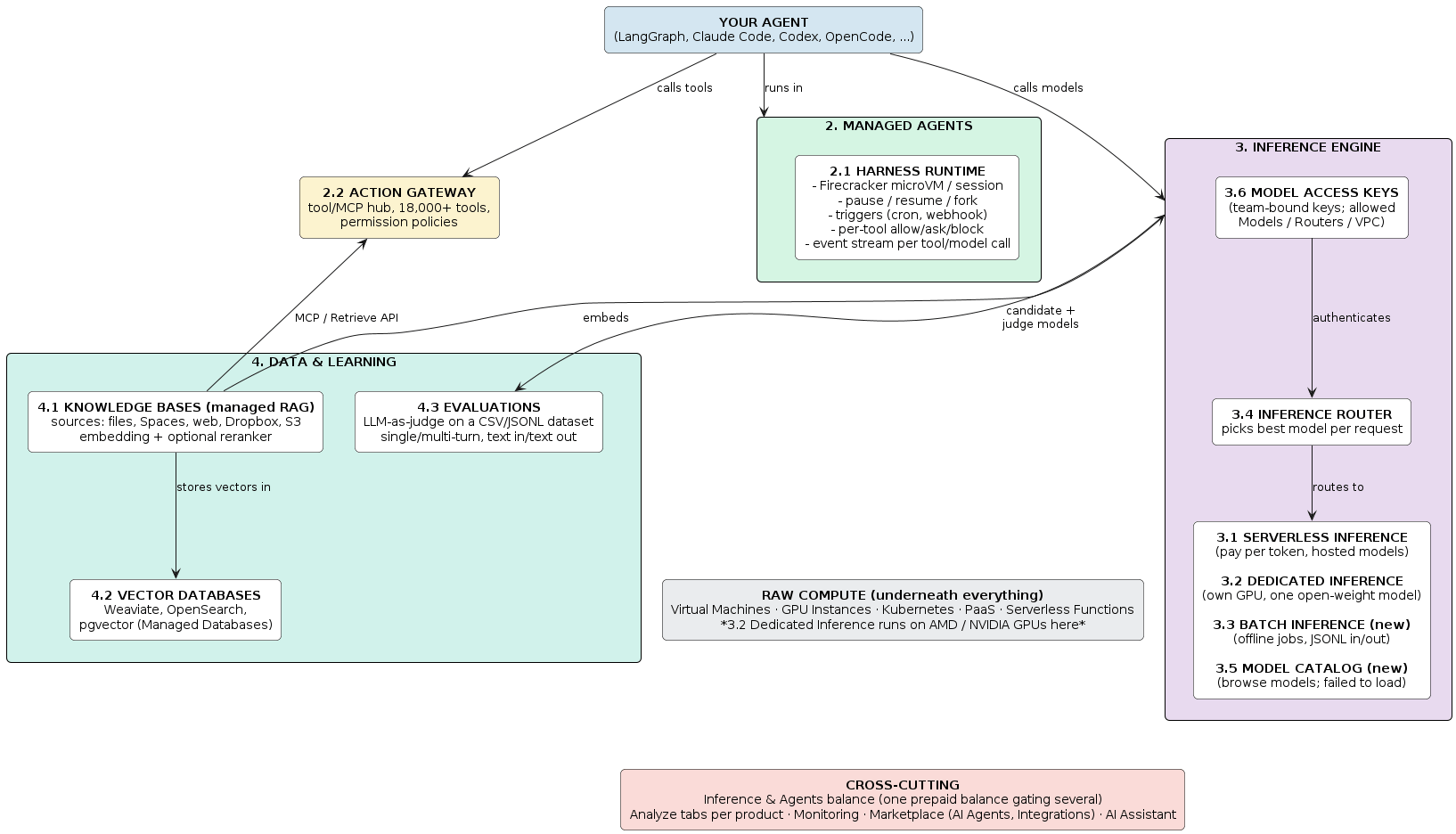
How the pieces connect
Common wiring across providers:
- Knowledge bases are queried through a retrieval API or MCP.
- Evaluations run a candidate model, either hosted serverless or from a third party, and score its output with a judge model.
- Dedicated inference endpoints run on GPUs, and serverless layers can hand off to them.
- Access keys grant calls to models and routers.
Wiring that varies by provider, so check before relying on it:
- Which model endpoint an agent runtime uses. Since you bring your own agent, the runtime often doesn't dictate one.
- Whether a router can reach dedicated endpoints and external providers, or only the provider's serverless models.
- Whether the tool gateway and the knowledge bases share a connection over MCP, or are separate integrations.
Lessons from running inference
- Traffic is spiky. A single agentic integration can multiply volume overnight, and one 200K-token request uses more GPU memory than a thousand short ones. Standard autoscaling heuristics don't fit.
- Utilization beats raw hardware. Ten nodes at 80% outperform twenty at 30%. Scheduling and serving optimizations add more effective capacity than more GPUs.
- Cold starts are infrastructure problems, dominated by weight pre-staging, memory availability and scheduling speed, not just model load time.
- Streaming shapes everything, from proxies to billing.
- Developers want reliability, not infrastructure: a working API, clear errors and transparent billing.
What to expect next
Providers are converging on caching for open-weight models, wider model catalogs including speech-to-text, regional hosting for data-residency rules such as GDPR, richer observability (cache hit rates, latency histograms, logs) and router support for coding agents. Treat roadmaps as plans, not commitments.
A tour of a full AI cloud
The sections above describe the layers in the abstract. This part shows what they look like as concrete products, using the shape that most AI clouds now share. Prices are illustrative ranges that vary by provider and change often, so check current price lists before budgeting. Product names are generic.
The console, layer by layer
A typical AI cloud console groups its products into the same layers:
| Layer | Typical products | What it is | Closest industry equivalents |
|---|---|---|---|
| Agent runtime | Managed agent runtime | A place to run agents (Claude Code, Codex and similar) in isolated microVM sandboxes | AWS Bedrock AgentCore, E2B and Vercel sandboxes, Anthropic Managed Agents |
| Tool / MCP gateway | Tool gateway | A hub that gives agents access to tools and MCP servers, with central auth, permissions and audit logs | Composio, Arcade |
| Models / inference | Serverless, dedicated, batch, router, model catalog, access keys | Call models by API and pay per token, rent a GPU endpoint for one model, run large offline jobs, or auto-pick a model per request | OpenAI API and AWS Bedrock (serverless), SageMaker endpoints (dedicated), OpenAI Batch API, OpenRouter and Martian (routers) |
| Data / context | Knowledge bases, vector databases, managed databases | Turn documents into searchable vectors for RAG, or run the vector engine yourself | Bedrock Knowledge Bases, Pinecone, Azure AI Search |
| Quality | Evaluations | Score a model's answers against a dataset using a judge model | Bedrock Model Evaluation, OpenAI Evals, LangSmith |
| Raw compute | GPU VMs, plus standard VMs, Kubernetes, functions | Rent GPU virtual machines by the hour | AWS EC2 P and G instances, Lambda Labs, CoreWeave |
| Distribution | Marketplace of agents and add-ons | Pre-built agents and tools you can deploy | AWS Marketplace |
Agent products are the newest layer and are mostly in preview. Older "generative AI platform" bundles are being split into the inference and agent sections above. A floating docs assistant in the console is also becoming common.
Managed agent runtime
A managed sandbox for running agents, with the capabilities listed in Managed agent runtimes: a microVM per session, bring-your-own agent, pause, resume and fork, triggers and permission policies. Billing is typically per-second and active-CPU only, so paused and idle time is free. Some runtimes also accept a custom container image as the template.
Pricing model. Expect pay-as-you-go plus optional subscription tiers. A typical shape is a small free credit for trials (single-digit dollars), a pro tier around $50 per month and a team tier around $200 per month, each bundling an allowance of tokens, agent-hours and storage, plus a percentage discount (roughly 15 to 20%) on usage. Discounts usually cover compute, memory, storage, tool calls and inference on provider-hosted open-weight models. Proprietary third-party models usually bill separately at the model vendor's rates. Allowances are estimates, not guarantees.
Runtimes commonly pause when the prepaid balance reaches zero, so a zero balance can look like an outage.
Tool gateway
A single hub that connects an agent to thousands of tools, APIs and MCP servers, with authentication, permissions and audit logs handled centrally. The idea is one integration instead of one per tool, and it works with any framework or MCP client.
| Concept | Meaning |
|---|---|
| Tool providers | The services that expose tools (GitHub, Jira, Notion, GitLab and so on) |
| Toolbelts | Versioned collections that define which tools an agent may use |
| Actors | The users, agents or services that own connections and sessions |
| Connections | Let a tool act on behalf of a provider account with specific permissions |
| Sessions | Bind an actor to permission and network policies, and expose an MCP URL |
| Insights | Usage, latency, status and errors per tool call |
How you connect: create a session, copy its MCP URL and register it in your MCP client (for example codex mcp add tool-gateway --url "<session-mcp-url>"). You sign in to each provider when prompted, so you manage no per-tool API tokens. A playground lets an agent find and run tools from chat, and Python and TypeScript SDKs are typical.
Gating: tools that incur their own cost (web search, web fetch, code execution) usually need prepaid balance. The rest work at zero balance.
Primer: what is a Firecracker microVM?
Source note: this primer is general background, not product documentation. Verify details against the Firecracker GitHub repo (
github.com/firecracker-microvm/firecracker) and current cloud docs before quoting.
In plain English. Firecracker is a small open-source program that creates tiny, fast, locked-down virtual machines. It is not an operating system. It is the engine that runs an operating system, usually a minimal Linux, inside an isolated box. Amazon built it for AWS Lambda and Fargate, released it in 2018 under the Apache 2.0 license and still leads it. It is written in Rust and uses Linux's built-in KVM virtualization.
A microVM is a virtual machine with everything non-essential removed: no graphics, no USB, no legacy hardware emulation. What is left is just enough for a Linux guest to boot, which makes it small and quick to start.
Why agent platforms use it as a sandbox. An agent writes and runs code, installs packages, opens browsers and calls tools. You must assume that code may be buggy, hostile (prompt injection) or both. So the question is how strong the wall around it is.
| Container (Docker) | Firecracker microVM | Regular VM (e.g. a cloud VM) | |
|---|---|---|---|
| Kernel | Shared with the host and other containers | Own kernel per sandbox | Own kernel |
| Isolation strength | Weaker: one kernel bug can let code escape | Strong, enforced by hardware virtualization | Strong |
| Start time | Milliseconds | Roughly 125 ms (Firecracker's own claim) | Tens of seconds to minutes |
| Memory overhead | Tiny | A few MB | Hundreds of MB or more |
| Density per host | Very high | High (thousands) | Low |
| Pause, snapshot, resume | Awkward | Built in: memory and processes can be saved and restored | Possible but slow and heavy |
| Typical use | Running your own trusted apps | Running untrusted or AI-generated code | Long-lived servers |
In short, containers are fast but share a kernel, so they are risky for untrusted code. Regular VMs are safe but slow and heavy. A microVM aims for VM-level safety at near-container speed.
What it enables for an agent runtime
- Safe to run generated code: each session has its own kernel, CPU and filesystem.
- Pause and resume: snapshots capture files, processes and context, so a session picks up where it left off.
- Per-second active-CPU billing: nothing is charged while a session is paused or waiting.
- Parallel sessions: thousands of cheap microVMs per host make sub-agents and forking affordable.
AWS Lambda, Fly.io and E2B use the same approach, so the isolation technology is not a differentiator. What a managed runtime adds is the session lifecycle, agent adapters, permission policies and the tool gateway.
Requirements to deploy it yourself
| Requirement | Detail |
|---|---|
| Host OS | Linux (x86_64 or aarch64) |
| Virtualization | KVM, meaning /dev/kvm must exist and be accessible |
| Hardware | A CPU with virtualization extensions (Intel VT-x or AMD-V) |
| Per-microVM inputs | An uncompressed Linux kernel image, a root filesystem image (for example ext4), and a small JSON config or API calls for CPU, memory, disk and network |
| Networking | You set up a TAP device and routing or NAT yourself |
| Permissions | Access to /dev/kvm (a user in the kvm group, or root), and usually the jailer helper for extra process isolation in production |
| Not included | Sandbox management: pause and resume orchestration, session APIs, image distribution, billing, auth, observability. You build these or use something on top (E2B's open-source stack, Kata Containers and similar) |
Where you can get KVM
- Bare metal servers work directly. This is why AWS Lambda runs on bare metal underneath.
- Cloud VMs with nested virtualization (a VM inside a VM). GCP supports it on many Intel and AMD machine types if you enable it, with some performance cost and a slightly weaker isolation story. Azure supports it on certain series. AWS generally needs
.metalinstances. Support varies by machine series, and ARM VMs are typically excluded, so check current docs. - Any other cloud VM: test it. Run
ls /dev/kvmandgrep -c -E 'vmx|svm' /proc/cpuinfo. If/dev/kvmis missing or the count is 0, Firecracker will not run there. - Provider-managed microVMs: some clouds now sell the raw microVM foundation for building your own agent platform, which avoids the nested-virtualization question.
Quick decision guide
- Trusted code, many instances, simplest ops: containers.
- Untrusted or AI-generated code, strong isolation, fast start: microVMs.
- Long-lived servers with full OS control: regular VMs.
- Want microVM sandboxes without running them: use a managed agent runtime.
Inference products
Most inference pages require an access key (see below).
Serverless inference
The OpenAI-style product. Call hosted models over an API and pay per token, with no servers to manage. It usually offers models from OpenAI, Anthropic, Meta and open-weight labs, and supports prompt caching and reasoning models.
- Playground: a chat UI with a model picker, side-by-side comparison and per-vendor terms acceptance.
- Analytics: dashboards for total tokens, requests per second, token usage over time (input and output), error rates, time to first token and end-to-end latency, plus counts of multimodal inputs.
- Cross-sell: the page typically links to dedicated inference for sustained load.
API surface
| Section | Plain English |
|---|---|
| Chat completions | The classic OpenAI-style /chat/completions endpoint: send a list of messages, get a reply |
| Responses | The newer, stateful OpenAI alternative, suited to multi-step tool use |
| Messages | An Anthropic-style /messages endpoint, so Claude-format clients can point at the provider |
| Multimodal | Send images, audio or video as input, not just text |
| Tool calling | The model can request calls to functions you define |
| Server-side tools | Tools the provider runs for the model, so you don't execute them yourself |
| Model list | An endpoint listing the model IDs you can call |
Exposing both OpenAI-style and Anthropic-style interfaces makes the service a drop-in endpoint for most coding agents and SDKs.
One endpoint, one key. A single base URL and a key that can be scoped to specific models and restricted to a VPC. Catalogs commonly advertise 30 or more models across text, code, vision, image, video and speech. Switching from OpenAI takes two lines, the base URL and the key:
from openai import OpenAI
import os

client = OpenAI(
    base_url="https://inference.example.com/v1/",
    api_key=os.getenv("MODEL_ACCESS_KEY"),
)
response = client.chat.completions.create(
    model="deepseek-v3.2",
    messages=[{"role": "user", "content": "Explain the CAP theorem."}],
)
For the Anthropic-compatible endpoint, set ANTHROPIC_BASE_URL to the provider's /v1/messages URL to run Claude Code and other agentic workflows against it.
Typical endpoints
| API | Type | Endpoint | Description |
|---|---|---|---|
| Models | Sync | /v1/models | List available models |
| Chat Completions | Sync | /v1/chat/completions | Chat-style prompts (text and vision-language models) |
| Responses | Sync | /v1/responses | Multi-step tool use, stateful interactions |
| Messages | Sync | /v1/messages | Anthropic-compatible (Claude Code, agentic workflows) |
| Image Generation | Sync | /v1/images/generations | Text-to-image, up to about 1 megapixel |
| Text-to-Speech | Sync | /v1/audio/speech | Binary audio |
| Embeddings | Sync | /v1/embeddings | Dense vectors for search and RAG |
| Video | Async | /v1/video/generations | Text-to-video (MP4, 480p or 720p) |
| Third-party models | Async | /v1/async-invoke | Image and speech via partner-hosted models |
Async results (such as video) typically expire a couple of hours after the job completes.
Architecture. The request path is the one in How a request flows. Typical building blocks are Redis for regional rate limits, Ray plus vLLM for open-weight models, and Kafka for billing events and telemetry.
Prompt caching. For Anthropic models, add cache_control with type: ephemeral and a ttl of 5m or 1h; the response reports cache-creation and cache-read tokens. For OpenAI models, prompts of 1,024 or more tokens accept prompt_cache_retention set to in_memory or 24h. See Prompt caching for why it is the largest cost lever.
{
  "model": "claude-sonnet",
  "messages": [{
    "role": "developer",
    "content": [{
      "type": "text",
      "text": "You are a helpful coding assistant.",
      "cache_control": {"type": "ephemeral", "ttl": "1h"}
    }]
  }]
}
Reasoning. The Anthropic format uses a reasoning object with effort and an optional max_tokens, and the response returns reasoning_content next to content. If max_tokens is omitted, the budget defaults to a share of max_completion_tokens (for example 20% for low up to 95% for max). The OpenAI format uses reasoning_effort directly (none, low, medium, high, max).
Built-in tools. Add a tool definition such as knowledge-base retrieval, mcp or web_search to the request and the platform runs it. Retrieval and MCP typically add no cost beyond tokens, while web search is billed per request, often around $10 per 1,000.
Reference pricing. Per-token prices fall into rough bands. Treat the figures as order-of-magnitude guides that move every few months.
| Model class | Input per 1M tokens | Output per 1M tokens | Typical use |
|---|---|---|---|
| Small and efficient models | $0.10 to $0.50 | $0.50 to $1.00 | Classification, extraction, high-volume routing |
| Open-weight mid-size and large models | $0.25 to $1.50 | $0.80 to $4.50 | General chat, coding, RAG |
| Frontier proprietary, standard tier | $2 to $5 | $10 to $25 | Agents, hard coding and reasoning tasks |
| Frontier proprietary, top tier | $10 or more | $50 or more | Highest-difficulty work |
| Image generation | about $0.05 to $0.10 per image | ||
| Short video generation | about $0.30 to $0.70 per clip | ||
| Text-to-speech | about $0.02 per 1K tokens, higher for premium voices |
Providers often discount open-weight models by 5 to 10% for off-peak hours. Proprietary models are usually passed through at the vendor's list price or with a small markup, so compare with the vendor's own price page before committing.
Security and privacy. Synchronous outputs are typically not stored, async outputs expire after a short window, and inputs are not retained for training or logging. Keys can be restricted to a VPC and scoped to specific models and batch inference. Billing is usually tiered with spend caps, where new accounts get open-weight models only and higher tiers unlock commercial models.
Dedicated inference
You rent GPUs and run one open-weight model on them behind your own endpoint. It is always on, billed hourly and gives predictable performance.
Create flow
- Pick a region.
- Choose a model: a pre-trained open-weight model (usually from Hugging Face) or one of your own.
- Choose a GPU plan, AMD or NVIDIA.
- Toggle the public HTTPS endpoint (off means reachable only inside your VPC).
- Set the number of accelerators and a unique name, then deploy.
Accelerator pricing. Rates run from roughly $2.50 to $3 per GPU-hour for large-memory AMD parts (192 to 256 GB VRAM) and a few dollars higher for top NVIDIA parts, with 8-GPU plans priced at eight times the single-GPU rate. Popular plans are sometimes unavailable, so have a fallback region or GPU.
Typical model picker. Catalogs of this kind carry dozens of open-weight models, grouped by publisher:
| Publisher | Example models |
|---|---|
| NVIDIA (optimised builds) | Nemotron families, plus NVFP4 builds of DeepSeek, GLM, Kimi, MiniMax and Qwen |
| DeepSeek | R1, R1-Distill-Llama-70B, V3, V3.2, V4 |
| Zhipu (GLM) | GLM-5 family |
| Moonshot | Kimi K2.x |
| Meta | Llama 3.1, 3.3 and 4 Instruct, Llama Guard |
| Qwen | Qwen2.5, Qwen3, Qwen3-Coder, Qwen3.5, Qwen3Guard |
| Mistral | Ministral 3, Mistral 7B Instruct |
| OpenAI | GPT-OSS 120B and 20B |
| Gemma 4 | |
| Others | Xiaomi MiMo, MiniMax M2.x |
Dedicated catalogs are open-weight only, with a strong Chinese-lab and NVIDIA presence. Anthropic and proprietary OpenAI models are available only through serverless, where the provider acts as a reseller or pass-through.
Batch inference
Submit thousands or millions of requests in one job and get results within 24 hours, at a lower price because it uses off-peak GPU capacity. It suits non-interactive work such as classification, evaluations and content enrichment, and is a direct analogue of the OpenAI Batch API.
API flow (5 steps): create a batch file intent, upload a JSONL file, create the batch job, fetch job status and download results. You can also list all jobs and cancel a job.
Inference router
Instead of hardcoding one model, the router evaluates each request and sends it to the best model for your goal (cost, latency or quality). You define goals in plain language or use presets. Prefix the router name with router: in the model field:
{
  "model": "router:my-support-router",
  "messages": [{"role": "user", "content": "What are your support hours?"}],
  "stream": true
}
The response's model field says which model was picked, and a response header says which task matched. Each task holds up to 3 models and a policy: cost efficiency, speed (time to first token), manual ranking, or an optimal setting based on the provider's benchmarking. No match means fallback models, and an unavailable model fails over automatically.
Typical presets are built from public benchmarks such as Arena and Artificial Analysis, plus the provider's own, and validated with human evaluation:
| Preset | Best for | Example tasks |
|---|---|---|
| Software engineering | Dev workflows | Bug fixing, code generation, test writing, performance optimisation, architecture, code review, security audit, DevOps, docs |
| General | Everyday language | Summarisation, extraction, brainstorming, translation, advice, classification, planning |
| Writing | Content | Creative writing, rewriting, email drafting, long-form articles |
| Knowledge base and document intelligence | Grounded retrieval | Long-document Q&A, RAG quality evaluation, text-and-table reasoning, support over a knowledge base |
Analytics: total requests, token usage, task match rate, fallback rate, input tokens cached, router distribution, request volume and router resolution latency.
Model catalog
A browsable list of models by use case (coding, agents, images, audio, video, search and retrieval) with filters, plus a place for your own uploaded models. In preview products it can be flaky, so fall back to the model list endpoint.
Access keys
API keys that give team-bound access to hosted models. Typical features: multiple keys per team for rotation across dev, staging and prod, optional expiry, and columns for allowed models, routers and VPC. Keys are billed per usage, so keep them server-side.
Data and learning
Knowledge bases
Managed RAG. Index your documents into a vector store so agents can answer from your data, without fine-tuning.
Create flow (3 steps: add data, configure database, review)
- Embedding model (cannot change after creation). Typical options are GTE, BGE, E5 and MiniLM, at roughly $0.05 to $0.15 per 1M tokens.
- Reranking model (optional, charged per retrieval), for example a BGE reranker.
- Data sources: file upload, object storage bucket or folder, web or sitemap URL, Dropbox, S3.
- Supported formats: pdf, docx, txt, csv, json, markdown and web URLs.
- Retrieval: a Retrieve API or MCP, so any MCP-ready agent can query it. Semantic and hybrid search.
- Auto-indexing: scheduled re-indexing when data changes.
Vector databases
Managed vector database clusters for semantic search, recommendations and RAG. Unlike knowledge bases (a managed pipeline), this is the raw database: you bring your own embedding and ingestion code.
Engines, choose one
- Weaviate: vector-native, hybrid search, built-in vectorisation modules. Often recommended for RAG.
- PostgreSQL with pgvector: vectors next to relational data. Best when you already use Postgres.
- OpenSearch: full-text plus k-NN vector search.
Plans are sized by vCPU, RAM and disk, and the create flow is a single page (engine, plan, region, name, project, tags). Typical entry-level plans cost around $20 per month, mid-size plans around $100 to $150 per month and large plans (8 vCPU, 32 GB RAM) well over $1,000 per month. Plans can usually scale up but not down.
Common features: hybrid vector and keyword search, built-in vectorisation, vertical scaling, encryption in transit and at rest, daily backups with point-in-time recovery and a logs and queries dashboard.
Evaluations
"LLM-as-a-judge". Test a candidate model on your own dataset and have a stronger judge model score the answers.
Wizard: 6 steps
- Evaluation type: single-turn (one prompt and one response per row) or multi-turn (a full conversation per row).
- Configure candidate: choose a hosted or third-party model, then a system prompt that guides how the candidate reads the dataset prompts.
- Choose dataset: pick an existing dataset or upload a
.csvor.jsonlfile (the dataset type must match single-turn or multi-turn). - Configure judge and metrics: choose the judge model (often an inexpensive open-weight model such as DeepSeek) and metrics. Common single-turn metrics are correctness (factual accuracy, often the default metric with an 80% pass threshold), completeness, ground-truth faithfulness and answer relevancy.
- Optional settings: name the run and save it as a preset.
- Run evaluation.
Because the judge model bills per token like any other call, the judge's price matters. A cheap, capable open-weight judge keeps evaluation runs affordable.
Managed databases and monitoring
Postgres, MySQL, Valkey, MongoDB, Kafka and OpenSearch sit in the same group. They are general data services rather than AI-specific ones, and monitoring is standard resource monitoring.
GPU VMs
GPU virtual machines billed hourly, with entry-level cards starting under $1 per GPU-hour and top-end cards (H200 class) around $4 to $5 per GPU-hour. An 8-GPU node costs roughly eight times the single-GPU rate. Deploy via UI, CLI or Terraform. AI/ML-ready images ship with drivers preinstalled.
Create flow highlights
- Image tabs: OS images, snapshots, custom images, AI/ML ready (Linux with GPU drivers bundled) and inference optimised (deploy any model faster with production-grade performance).
- Purchase options: on-demand (SLA-backed hourly) or spot (cheaper, interruptible). Newest hardware, such as B300-class parts, is often reserved-only on 12-month contracts.
- GPU platform: NVIDIA (H200, H100, B300, L40S, RTX 6000 Ada, RTX 4000 Ada) or AMD (MI300X, MI325X).
- Extras: automated backups, block storage volumes, SSH keys, VPC networking with optional public IPs, a free metrics agent, startup scripts, projects and tags.
Marketplace: AI solutions
AI marketplaces typically list a few dozen agents and tools, mostly as 1-click VMs: pre-installed images you deploy onto a VM with one click. A few are add-ons (SaaS you activate from the control panel). The model category is often empty, because model distribution happens through the inference products instead.
Typical agent listings
| Kind | Examples | What it does |
|---|---|---|
| Personal assistants | OpenClaw | An AI assistant on your own server that talks to you through chat apps |
| General agents | Hermes Agent (Nous Research) | Self-improving agent with memory across sessions, its own skills and scheduled automations |
| Coding agents | OpenHands, OpenCode, Goose, Codex CLI, Grok Build | Terminal and web coding agents, often pre-wired to the provider's serverless inference |
| Agent runtimes | ZeroClaw, NemoClaw | Small runtimes that abstract models, tools, memory and execution |
| Business agents | IVP.ai Deskless, AdClaw | "AI employees" for ops, finance and sales, or marketing agent teams |
| Governance and orchestration | Nasiko, Trinity, Operate | Agent registries, cost accounting, fleets of containerised agents, visibility into what agents changed |
Typical tool listings
| Name | What it does |
|---|---|
| AnythingMCP | Self-hosted MCP middleware that turns any REST, SOAP, GraphQL or database API into an MCP server |
| Celiums Memory AI | Self-hosted persistent memory for agents, exposed over MCP |
| Ollama with Open WebUI | Run and chat with open models on a VM |
Observations
- The marketplace is a "run the agent yourself on a VM" channel, in contrast with a managed runtime where the provider runs it for you.
- Most listings are coding agents, and several are pre-configured for the provider's serverless inference, so they act as a demand funnel.
- Several agents (Hermes, OpenCode, Codex) appear both as 1-clicks and as supported runtime adapters.
- Most listings are third-party or open-source.
Tutorials and docs
Good provider documentation follows a consistent pattern worth copying.
Worked examples for an agent runtime are each a full environment spec plus commands:
| Tutorial | What it does |
|---|---|
| Refactor a repository | Long refactor in a sandbox, disconnect, resume the same workspace later |
| Review pull requests | Unattended first-pass review from a GitHub webhook, delivered to chat |
| Draft marketing content | Weekly research, drafts in brand voice, commits for review |
| Review documents | Check contracts against a clause checklist in a locked-down environment |
| Triage incidents | Gather context from observability tools when an alert fires |
| Serve tenants from one environment | Isolated session per customer from one saved config |
How-tos typically cover:
- Environments: using a coding adapter (Codex, Claude Code, OpenCode), environment configs, custom sandbox templates, agent permissions and a session hardening checklist.
- Frameworks: LangGraph, Hermes and the OpenAI Agents API.
- Tools: connecting the tool gateway and GitHub (OAuth, so a session can clone, commit and open PRs).
- Sessions: managing sessions, transferring files, forwarding ports, checkpoint, fork and rollback.
- Operating: running agents with triggers, monitoring sessions and paying for the runtime.
Docs structure: Quickstart, Examples, How-Tos, Reference (environment spec, CLI), Concepts (architecture, agent adapters, sandboxes, sessions, permission policies, approvals, secrets, network egress) and Details (features, pricing, availability, limits, data privacy). Many docs sites also expose an llms.txt and a "view page as Markdown" option, which helps agents consume them.
In-console cards. Each product page ends with four cards: product docs, tutorials, education and API docs. It is a consistent template worth copying.
How it maps to the industry standard
A typical AI cloud offers a model API, dedicated endpoints, batch, routing or a gateway, RAG, a vector store, evals, guardrails, an agent runtime, a tool gateway, GPUs and observability. A full-stack provider covers nearly all of it:
| Industry building block | Product category | Typical maturity |
|---|---|---|
| Model API (pay per token) | Serverless inference | GA |
| Dedicated endpoint | Dedicated inference (AMD and NVIDIA GPUs) | Live, some GPUs capacity-limited |
| Batch API | Batch inference | New |
| Model router or gateway | Inference router | Preview |
| Model catalog | Model catalog | New |
| API keys | Access keys | Live |
| RAG | Knowledge bases (with MCP and reranking) | Live |
| Vector DB | Weaviate, OpenSearch, pgvector | Mixed, some in preview |
| Evals | Evaluations (LLM-as-judge) | Live |
| Agent runtime | Managed agent runtime | Preview |
| Tool gateway / MCP hub | Tool gateway | Preview |
| Guardrails | Often surfaced only as a quota or limit counter | Unclear |
| GPU compute | GPU VMs | Live |
| Observability | Per-product analytics tabs, monitoring | Live |
Distinguishing traits to look for: agent-first positioning (pause, resume and fork microVMs, per-second active-CPU billing), one prepaid balance gating several products, an open-weight-heavy dedicated catalog, MCP as the integration surface for both knowledge bases and the tool gateway, and a consistent docs card row on every product.
Rough edges to expect in preview products: catalogs that fail to load, playgrounds that show raw IDs instead of model names, generic error pages when the balance is zero, and GPU plans that are sometimes unavailable.
Questions to ask when evaluating a provider
- Does the serverless model list match the prices on the public price page, and are proprietary models passed through at vendor rates?
- Which GPU families are offered for dedicated endpoints, and how often are plans capacity-limited?
- Can you bring your own model, and what are the limits?
- What are the router's custom-policy options, and what does routing cost on top of tokens?
- What are the batch discount and turnaround guarantees?
- Where do guardrails live, and are they billed separately?
- Are the vector database plans documented for every engine, including downgrade rules?
- What does the agent runtime cost for a realistic session, including idle and paused time?