
MCP Servers Demystified
How the Model Context Protocol really works -- why the AI never touches MCP, how the harness bridges tools to the model, and what makes a server valid MCP.
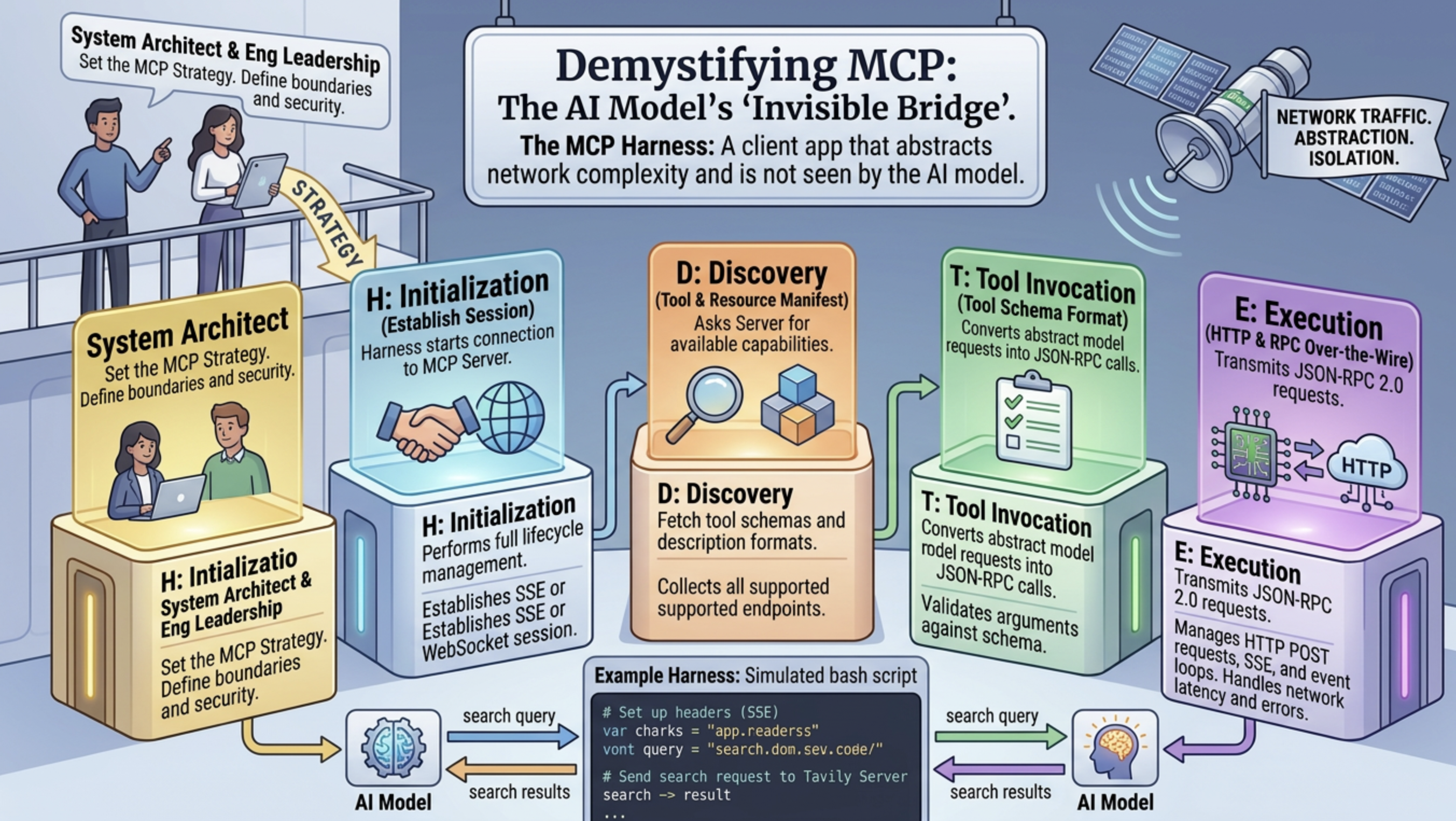
The AI agent never touches MCP directly -- the harness is the translator. The model only ever sees plain tool definitions; the harness handles every byte of the protocol underneath. Here is the full flow.
The Harness is the Bridge
MCP Server          Harness (Claude Code, etc.)          AI Model
──────────          ───────────────────────────          ────────

1. tools/list ───►  receives JSON schemas
                    converts to model tool format  ──►   sees plain tools +
                                                         descriptions

                    user sends message             ──►   AI decides to call
                                                         "web_search"

                    ◄── tool_call response                AI returns:
                                                         { name: "web_search",
                                                           input: { query: "..." } }

2. tools/call ◄──   harness intercepts,
   (JSON-RPC)       routes to MCP server

   result    ──►    harness receives SSE response
                    wraps it as tool result        ──►   AI sees the result
                                                         like any other text
What the AI Actually Sees
When the harness registers an MCP server, it calls tools/list, gets the JSON schemas, and injects them into the model's context as native tool definitions. From the model's perspective it looks exactly like this:
You have access to the following tools:

- web_search(query: string, max_results?: int, ...)
  "Search the web for current information on any topic..."

- extract_content(urls: string[], format?: string, ...)
  "Extract content from URLs..."

- deep_research(input: string, model?: string)
  "Perform comprehensive research..."
The AI has no idea these come from an MCP server over HTTP. It just sees tool names, descriptions, and input schemas -- the same way it sees any built-in tool.
The Key Insight
The AI learns how to use a tool entirely from three things:
- The description field -- tells it when to use the tool.
- The input schema -- tells it what params to pass and their types.
- Its training -- it already knows how to call tools generically.
That is why tool descriptions matter so much. A single well-written sentence such as:
"Search the web for current information on any topic. Use for news, facts, or data beyond your knowledge cutoff."
...teaches the model when to reach for that tool versus something else. The MCP protocol is completely invisible to it -- the harness handles all the JSON-RPC, SSE parsing, session management, and result injection automatically.
Anatomy of a Remote MCP Server
A remote MCP server is, at bottom, just an HTTP endpoint that speaks a specific dialect:
- Protocol: MCP over HTTP POST, using JSON-RPC 2.0 with an SSE (Server-Sent Events) response format.
- Requests: every request body is a JSON-RPC 2.0 message; servers typically reject
GETwith405. - Responses: streamed as SSE, e.g.
event: message\ndata: {...}\n\n. - Auth: vendor-specific -- commonly an API key passed as a header or a query param. This is not part of the MCP spec.
At initialization the server declares its capabilities, for example:
{
  "logging": {},
  "prompts": { "listChanged": true },
  "resources": { "subscribe": false, "listChanged": true },
  "tools": { "listChanged": true },
  "extensions": { "io.modelcontextprotocol/ui": {} }
}
What Makes a Server "Valid" MCP
A server is a valid MCP server purely because it speaks the protocol. Specifically, it:
- Accepts POST with JSON-RPC 2.0 -- the wire format MCP mandates.
- Responds with SSE (
event: message\ndata: {...}) -- the transport MCP defines for HTTP. - Implements the required methods:
initialize-- handshake, declares server capabilities and protocol version.tools/list-- exposes tool schemas the harness can discover.tools/call-- executes a tool and returns results.
- Declares a
protocolVersion(e.g.2024-11-05) -- it self-identifies as MCP-compliant.
That is the whole contract. Any server that accepts initialize and responds with capabilities, answers tools/list with valid JSON schemas, and executes tools/call is a valid MCP server. The URL, the language it is written in, whether it is hosted remotely or locally -- none of that matters. It is just an HTTP server that happens to speak this specific JSON-RPC dialect.
Exemplification of the harness MCP registration with .sh
To make this concrete, here is a real remote MCP server: Tavily. It exposes web-search and research tools and follows the exact contract above.
Tavily MCP endpoint
- URL pattern:
https://mcp.tavily.com/mcp/?tavilyApiKey=<key> - Server:
tavily-mcpv3.3.1, protocol version2024-11-05 - Auth: API key in the query string (
tavilyApiKey=...), which is Tavily's choice, not an MCP requirement.
The 5 exposed tools
| Tool | Purpose |
|---|---|
tavily_search | Web search -- returns snippets + URLs |
tavily_extract | Extract full content from a list of URLs (markdown or text) |
tavily_crawl | Crawl a site recursively with depth/breadth controls |
tavily_map | Map a site's URL structure (returns list of discovered links) |
tavily_research | Deep multi-source research with mini/pro/auto depth modes |
Key params per tool
tavily_search--query(required),search_depth(basic/advanced/fast/ultra-fast),time_range,max_results,include_raw_content,include_domains,exclude_domains,country,start_date/end_date.tavily_extract--urls[](required),extract_depth(basic/advanced),format(markdown/text),query(for relevance reranking).tavily_crawl--url(required),max_depth,max_breadth,limit,instructions(NL guidance),select_paths/select_domains(regex filters).tavily_map-- same as crawl but returns a URL list only, no content.tavily_research--input(research task description),model(mini/pro/auto), rate-limited at 20 req/min.
The script below simulates exactly what a harness does when it connects to this server.
Step 1 -- initialize: the harness introduces itself and negotiates the protocol version. The server responds with the capabilities it supports (tools, prompts, resources, logging). If versions were incompatible, the harness would abort here.
Step 2 -- tools/list: the harness downloads all tool schemas. This is the moment it learns what tools exist and what params they accept, then converts those schemas into whatever format the AI model expects (Anthropic tool definitions, OpenAI function calling, etc.).
Step 3 -- tools/call: the AI produced a tool call (e.g. tavily_search with query: "..."). The harness intercepts it, fires this POST, gets the SSE result back, unwraps it, and injects the content into the AI's next turn as a tool_result message.
The AI never sent a single byte to mcp.tavily.com. That is entirely the harness's job.
#!/usr/bin/env bash
# Simulates what a harness does when connecting to a remote MCP server over HTTP+SSE.
# Steps: initialize -> tools/list -> tools/call (tavily_search)

# Set your key in the environment: export TAVILY_API_KEY="tvly-..."
MCP_URL="https://mcp.tavily.com/mcp/?tavilyApiKey=${TAVILY_API_KEY}"
HEADERS=(-H "Content-Type: application/json" -H "Accept: application/json, text/event-stream")

parse_sse() {
  # Extract the JSON payload from SSE "data: {...}" lines
  grep '^data:' | sed 's/^data: //'
}

echo "━━━━━━━━━━━━━━━━━━━━━━━━━━━━━━━━━━━━━━━━"
echo "STEP 1 -- initialize (harness handshake)"
echo "━━━━━━━━━━━━━━━━━━━━━━━━━━━━━━━━━━━━━━━━"

INIT_RESPONSE=$(curl -s -X POST "$MCP_URL" \
  "${HEADERS[@]}" \
  -d '{
    "jsonrpc": "2.0",
    "id": 1,
    "method": "initialize",
    "params": {
      "protocolVersion": "2024-11-05",
      "capabilities": {},
      "clientInfo": { "name": "my-agent-harness", "version": "1.0.0" }
    }
  }' | parse_sse)

echo "$INIT_RESPONSE" | python3 -m json.tool 2>/dev/null || echo "$INIT_RESPONSE"

# Extract session ID if the server returns one (some MCP servers do)
SESSION_ID=$(echo "$INIT_RESPONSE" | python3 -c "import sys,json; d=json.load(sys.stdin); print(d.get('result',{}).get('sessionId',''))" 2>/dev/null)

echo ""
echo "━━━━━━━━━━━━━━━━━━━━━━━━━━━━━━━━━━━━━━━━"
echo "STEP 2 -- tools/list (harness discovers tools)"
echo "━━━━━━━━━━━━━━━━━━━━━━━━━━━━━━━━━━━━━━━━"

TOOLS_RESPONSE=$(curl -s -X POST "$MCP_URL" \
  "${HEADERS[@]}" \
  ${SESSION_ID:+-H "Mcp-Session-Id: $SESSION_ID"} \
  -d '{
    "jsonrpc": "2.0",
    "id": 2,
    "method": "tools/list",
    "params": {}
  }' | parse_sse)

# Print just the tool names + descriptions (not the full schema, that's verbose)
echo "$TOOLS_RESPONSE" | python3 -c "
import sys, json
data = json.load(sys.stdin)
tools = data.get('result', {}).get('tools', [])
print(f'Found {len(tools)} tools:')
for t in tools:
    print(f\"  • {t['name']}: {t['description'][:80]}...\")
" 2>/dev/null || echo "$TOOLS_RESPONSE"

echo ""
echo "━━━━━━━━━━━━━━━━━━━━━━━━━━━━━━━━━━━━━━━━"
echo "STEP 3 -- tools/call (AI decided to call tavily_search)"
echo "  (harness intercepts AI tool call, routes it here)"
echo "━━━━━━━━━━━━━━━━━━━━━━━━━━━━━━━━━━━━━━━━"

CALL_RESPONSE=$(curl -s -X POST "$MCP_URL" \
  "${HEADERS[@]}" \
  ${SESSION_ID:+-H "Mcp-Session-Id: $SESSION_ID"} \
  -d '{
    "jsonrpc": "2.0",
    "id": 3,
    "method": "tools/call",
    "params": {
      "name": "tavily_search",
      "arguments": {
        "query": "MCP Model Context Protocol explained",
        "max_results": 2,
        "search_depth": "basic"
      }
    }
  }' | parse_sse)

echo "$CALL_RESPONSE" | python3 -c "
import sys, json
data = json.load(sys.stdin)
content = data.get('result', {}).get('content', [])
for block in content:
    if block.get('type') == 'text':
        # Parse the inner JSON that Tavily wraps results in
        try:
            inner = json.loads(block['text'])
            results = inner.get('results', [])
            print(f'Got {len(results)} search result(s):')
            for r in results:
                print(f\"  Title : {r.get('title')}\")
                print(f\"  URL   : {r.get('url')}\")
                print(f\"  Score : {r.get('score')}\")
                print(f\"  Snippet: {r.get('content','')[:120]}...\")
                print()
        except Exception:
            print(block['text'][:500])
" 2>/dev/null || echo "$CALL_RESPONSE"

echo "━━━━━━━━━━━━━━━━━━━━━━━━━━━━━━━━━━━━━━━━"
echo "Done. The harness would now inject the tool result"
echo "back into the AI's context as a tool_result message."
echo "━━━━━━━━━━━━━━━━━━━━━━━━━━━━━━━━━━━━━━━━"
Building Your Own MCP Server
You do not have to hand-roll the JSON-RPC and SSE plumbing shown above. The official SDKs do it for you, so you write tools and let the SDK handle the transport, schema generation, and protocol handshake.
If you are choosing with no other constraint, lean toward the official TypeScript SDK for the "industry accepted" path, and Python FastMCP for the "fastest developer experience."
Official TypeScript SDK
The TypeScript SDK is an official Tier 1 SDK, and the repo includes runnable server examples and framework adapters.
import { McpServer } from "@modelcontextprotocol/sdk/server/mcp.js";
import { StdioServerTransport } from "@modelcontextprotocol/sdk/server/stdio.js";
import { z } from "zod";

const server = new McpServer({ name: "demo", version: "1.0.0" });

server.tool(
  "add",
  { a: z.number(), b: z.number() },
  async ({ a, b }) => ({
    content: [{ type: "text", text: String(a + b) }],
  })
);

await server.connect(new StdioServerTransport());
Official Python SDK / FastMCP entrypoint
The Python SDK is Tier 1, and its docs show a compact server using FastMCP with tool, resource, and prompt decorators.
from mcp.server.fastmcp import FastMCP

mcp = FastMCP("demo")

@mcp.tool()
def add(a: int, b: int) -> int:
    """Add two numbers."""
    return a + b

@mcp.resource("greeting://{name}")
def greeting(name: str) -> str:
    """Return a personalized greeting."""
    return f"Hello, {name}!"

if __name__ == "__main__":
    mcp.run()
FastMCP 2.0
FastMCP positions itself as a production-oriented framework with auth, testing, deployment, composition, and proxying on top of core MCP support. If you outgrow the basics, it is the natural next step in the Python ecosystem.